
How to Identify an Official Moderator in Fight Arena
🛡️ How to Identify an Official Moderator in Fight Arena
Player safety and trust are top priorities in Fight Arena.
To prevent confusion or impersonation attempts, we’ve implemented a clear identification system for official moderators.
Here are the three indicators that confirm a moderator’s authenticity:
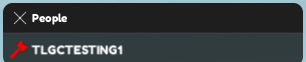
⚒️ 1. The Hammer Icon in the Player List
Every moderator has a hammer icon next to their name in the player list.
This icon may vary depending on the moderator’s rank, but it will always appear next to official staff members.
📸 Example:
🏷️ 2. The Moderator Tag and Rank Below the Player’s Name
Under the player’s name, you will see the moderator’s tag and rank (for example: [Moderator], [Senior Mod], etc.).
This tag may differ depending on rank, but it will always appear for official moderators.
📸 Example:

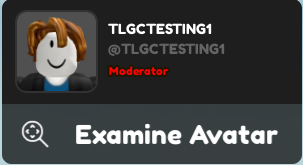
👤 3. “Moderator” Shown in the User Profile
When you click on a player’s profile, an inscription saying “Moderator” confirms their official status.
Like the other indicators, this label may slightly change depending on the moderator’s rank.
📸 Example:
🚨 Beware of Fake Moderators
If a player claims to be a moderator without these three official indicators, they are not a real moderator.
Some may try to threaten you with “punishments” or ask for personal information — do not trust them.
➡️ Report them immediately to the official staff so proper action can be taken.
❗ Important Reminder
Even if you are contacted by a real moderator, never share sensitive information (passwords, emails, personal data, etc.).
Official moderators will never ask for such details.
Always report suspicious or inappropriate behavior immediately!